
We are using cookies in order to give you the most relevant experience. To use the site, it is necessary to accept the cookie policy.
Jump to your selection with a dedicated key.
Change views with a single press.
Turn shortcut sequences into one action.
Use rotary knobs for compatible adjustments.
Switch between solid and wireframe views without navigating menus. Assign your 3D software’s viewport shortcut to a button in KeyForge Master, and keep it within reach.
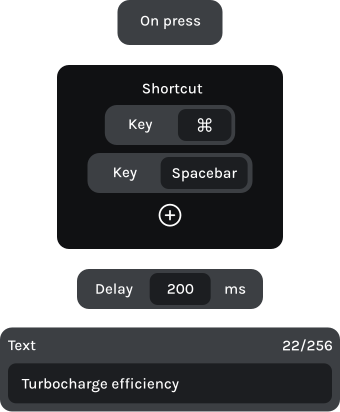
Make MK-01 work the way you model. With KeyForge Master, assign your favorite shortcuts, configure your knobs, and combine multiple commands into complex flows. Save up to five configurations directly to your device.

Button 1
Bevel vertices
Ctrl + Shift + B
Button 2
Loop cut
Shift + R
Knob 1 | Left
Ctrl + Z
Knob 1 | Right
Ctrl + Shift + Z

Move between the full scene and selected geometry without searching through menus. Switch viewport shading modes using dedicated physical controls.
Button 1
Button 2
Loop/Path cut
Knob 1 | Left
Undo view
Ctrl + Shift + Z
Knob 1 | Right
Restore view
Ctrl + Shift + Y

Button 1
Component colors
Button 2
Toggle browser
Knob 1 | Left
Undo
Ctrl + Z
Knob 1 | Right
Redo
Ctrl + Y