KeyForge for AI power users

Make AI work even faster

Keep your favorite AI tools, reusable prompts, and custom actions within reach. Turn repetitive steps into dedicated physical controls.
Typing the same prompts?
Insert reusable instructions with one press.
Keep your favorite commands within reach.
Combine commands into custom actions.
Save dedicated configs for each task.

Your prompts.
One press.

Turn your most-used prompts into one-touch actions. With KeyForge Master, configure a button to enter your instructions and send them directly into your AI chat.

Click to try
Macropad button
Idle
Your next idea starts here.

One action can prepare a prompt and start a conversation.

Ask something...

Build your own setup.

A DEDICATED CONFIGURATOR
DESIGNED AROUND YOUR WORKFLOW
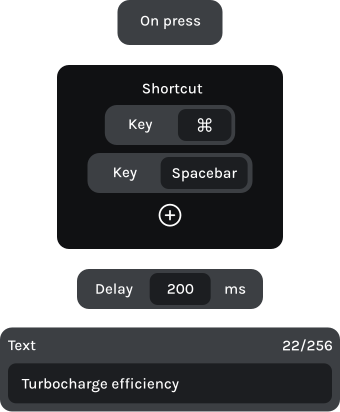
Make MK-01 work the way you use AI. With KeyForge Master, assign your shortcuts, insert reusable prompts, and combine commands into complex flows. Save up to five configurations directly to your device. No account required.
action sequence

From first prompt to final output.

Stay in the conversation.

Insert reusable prompts, start fresh conversations, and navigate between chats using dedicated physical controls.

Button 1

Open companion window

Alt + Space

Button 2

Insert reusable prompt

Text block + Enter

Knob 1 | Left

Previous chat

Ctrl + Page up

Knob 1 | Right

Next chat

Ctrl + Page down

Less typing. More thinking.

Keep your favorite instructions ready to use. Start new conversations and navigate longer responses without relying entirely on your mouse.

Button 1

Insert reusable prompt

Text action

Button 2

New chat

Text block + Enter

Knob 1 | Left

Scroll up

Page up

Knob 1 | Right

Scroll down

Page down

Keep your focus on code.

Bring your AI assistant into the workflow, send selected code for context, and navigate between files using dedicated controls.

Button 1

Add selection to chat

Ctrl + Shift + L

Button 2

Open inline edit

Ctrl + L

Knob 1 | Left

Previous chat

Ctrl + [

Knob 1 | Right

Next chat

Ctrl + ]

Frequently asked questions

Is MK-01 compatible with my software?
Yes. MK-01 works with almost any application that supports keyboard shortcuts and text input. Whether you’re using ChatGPT, Claude, Cursor, or other AI tools, you can configure its controls around your workflow.
Yes. With KeyForge Master’s Text actions, you can assign reusable prompts or instructions to dedicated buttons. Press a button to insert your saved text into the active input field without typing it again.
Yes. Advanced Custom Actions let you combine keyboard shortcuts, text, and delays into one action. You can build sequences for repetitive tasks, provided your AI tool supports the necessary keyboard interactions.
Yes. MK-01 stores up to five configurations directly on the device. Create different layouts for ChatGPT, Claude, AI coding assistants, or other workflows, and switch between them whenever you need.
KeyForge Master is available for Windows, macOS, and Linux. Configure your MK-01 using the desktop application and save your settings directly to the device.
Yes. Each knob supports clockwise rotation, counterclockwise rotation, and a button press. Assign shortcuts for scrolling, navigating conversations, switching tabs, or other actions supported by your software.

Make your first
workflow upgrade
for less

Join the Forge and get 10% off your first device, plus product updates and workflow ideas.