KeyForge for 3D creators

Less menu
diving. More
modeling.

Bring your most-used 3D shortcuts within reach. Assign scene navigation, viewport changes, and repetitive actions to dedicated physical controls.
Lost in complex scenes?
Jump to your selection with a dedicated key.
Change views with a single press.
Use rotary knobs for compatible adjustments.
Turn shortcut sequences into one action.

Switch views.
One press.

Switch between solid and wireframe views without navigating menus. Assign your 3D software’s viewport shortcut to a button in KeyForge Master, and keep it within reach.

Click to try
Macropad button
Solid

Build your own setup.

A DEDICATED CONFIGURATOR
DESIGNED AROUND YOUR WORKFLOW

Make MK-01 work the way you model. With KeyForge Master, assign your favorite shortcuts, configure your knobs, and combine multiple commands into complex flows. Save up to five configurations directly to your device.
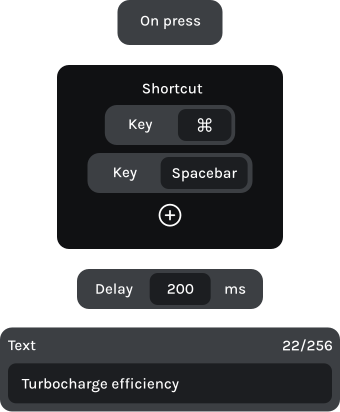

action sequence

From first shape to final detail.

Navigate your scene, your way.

Keep your most-used viewport controls within reach. Frame a selected object, return to the full scene, or orbit your view using the MK-01’s keys and rotary knobs.

Button 1

Bevel vertices

Ctrl + Shift + B

Button 2

Loop cut

Shift + R

Knob 1 | Left

Undo

Ctrl + Z

Knob 1 | Right

Redo

Ctrl + Shift + Z

Stay focused on your model.

Move between the full scene and selected geometry without searching through menus. Switch viewport shading modes using dedicated physical controls.

Button 1

Bevel
M, S

Button 2

Loop/Path cut

K, L

Knob 1 | Left

Undo view

Ctrl + Shift + Z

Knob 1 | Right

Restore view

Ctrl + Shift + Y
Keep your tools within reach.

Access frequently used modeling commands with dedicated buttons. Fit your model to the viewport, start an extrusion, or move backward and forward through your edits.

Button 1

Component colors

Shift + N

Button 2

Toggle browser

Ctrl + Alt + B

Knob 1 | Left

Undo

Ctrl + Z

Knob 1 | Right

Redo

Ctrl + Y

Frequently asked questions

Is MK-01 compatible with my software?
Yes. MK-01 works with almost any application that supports keyboard shortcuts. Whether you’re using Blender, Cinema 4D, Fusion 360, or another creative tool, you can configure its keys and knobs around the commands you use most.
Yes. You can assign shortcuts to each knob’s clockwise rotation, counterclockwise rotation, and button press. Use them for zooming, changing views, or other viewport commands supported by your software.
Yes. MK-01 can store up to five configurations directly on the device. Create different layouts for modeling, sculpting, rendering, or individual applications, and switch between them whenever you need.
KeyForge Master is available for Windows, macOS, and Linux. You can configure your MK-01 on any of these platforms and save your settings directly to the device.
No. Your configurations are saved directly to MK-01, so standard shortcuts and key mappings work without keeping the configurator open. Certain advanced actions that interact with your computer may require KeyForge Master to be running.
Yes. With KeyForge Master’s Advanced Custom Actions, you can combine shortcuts, key presses, and delays into a single action. This lets you execute repetitive modeling sequences with one button press, as long as your software supports the required commands.

Make your first
workflow upgrade
for less

Join the Forge and get 10% off your first device, plus product updates and workflow ideas.