KeyForge for Developers

Less typing.
More building.

Keep your most-used shortcuts, terminal commands, and debugging controls within reach. Customize physical keys and knobs around the way you code.

Repeating terminal commands?
Run saved commands with one press.
Launch apps and run setup commands.
Switch between saved configurations.
Control debugging with dedicated keys.

Start your dev server.
One press.

With KeyForge Master, configure a button to open your terminal, enter npm run dev, and start your development server. One press triggers the entire sequence.

Click to try
Macropad button
Editor
src / index.ts
const status = "ready";
console.log(status);

Build your own setup.

A DEDICATED CONFIGURATOR
DESIGNED AROUND YOUR WORKFLOW
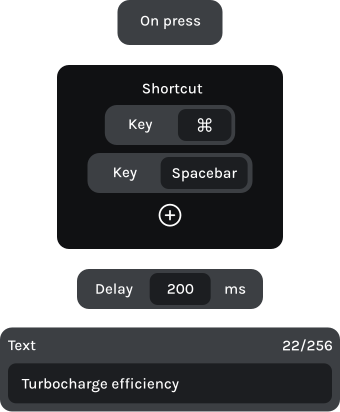
Make MK-01 work the way you code. With KeyForge Master, assign editing shortcuts, debugging controls, and multi-step actions to your keys and knobs. Create up to five configurations for different projects or workflows.
action sequence

From first line to final commit.

Stay focused on your code.

Open your terminal, start debugging, and navigate through your code without interrupting your workflow.

Button 1

Format document

Shift + Alt + F

Button 2

Quick fix

Ctrl + .

Knob 1 | Left

Previous problem

Shift + F8

Knob 1 | Right

Next problem

F8

Code. Run. Debug. Repeat.

Keep essential development commands on dedicated controls. Run configurations, start debugging sessions, and navigate through your code with ease.

Button 1

Reformat code

Ctrl + Alt + L

Button 2

Refactor this

Ctrl + Alt + Shift + T

Knob 1 | Left

Previous error

Shift + F2

Knob 1 | Right

Next error

F2

Your commands, one press away.

Keep frequently used Git commands at your fingertips. Check your repository, pull updates, and navigate command history using dedicated physical controls.

Button 1

Git status

git status + Enter

Button 2

Git diff summary

git diff –stat + Enter

Knob 1 | Left

Previous command

Up arrow

Knob 1 | Right

Next command

Down arrow

Frequently asked questions

Is MK-01 compatible with my development tools?
Yes. MK-01 works with almost any application that supports keyboard shortcuts. Whether you use VS Code, JetBrains IDEs, terminal applications, or other development tools, you can configure its keys and knobs around your workflow.
Yes. With KeyForge Master’s Advanced Custom Actions, you can configure buttons to type commands such as git status, git pull, or npm run dev and execute them in your active terminal.
Yes. You can combine shortcuts, text, delays, and app-launching actions into a single sequence. Use one button to open development tools and run setup commands, provided the applications and working directories are configured correctly.
Yes. MK-01 stores up to five configurations directly on the device. Create dedicated layouts for different IDEs, projects, or workflows, and switch between them whenever you need.
KeyForge Master is available for Windows, macOS, and Linux. Configure your MK-01 using the desktop application and save your settings directly to the device.
Yes. Each knob supports clockwise rotation, counterclockwise rotation, and a button press. Assign shortcuts for navigating files, switching tabs, scrolling, or other commands supported by your development environment.

Make your first
workflow upgrade
for less

Join the Forge and get 10% off your first device, plus product updates and workflow ideas.