
We are using cookies in order to give you the most relevant experience. To use the site, it is necessary to accept the cookie policy.
Play, stop, and record with dedicated keys.
Use physical knobs with MIDI-mapped controls.
Assign mute controls to dedicated buttons.
Combine multiple actions into one press.
With KeyForge Master, configure a button to send a MIDI message and map it to a drum pattern in your DAW. Press the button to trigger playback without reaching for your mouse.
A DEDICATED CONFIGURATOR
DESIGNED AROUND YOUR WORKFLOW
Make MK-01 work the way you create music. With KeyForge Master, assign MIDI messages, DAW shortcuts, and custom actions to your keys and knobs. Create up to five configurations for different applications or workflows.
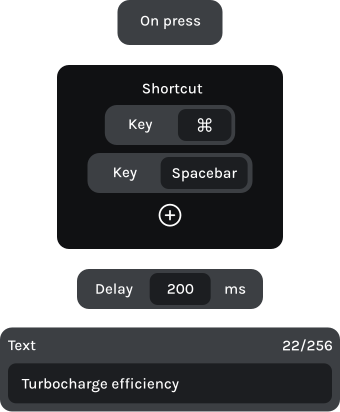
Launch clips, control playback, and adjust effects using dedicated physical controls. Spend less time navigating your DAW and more time creating.
Button 1
Consolidate selection
Button 2
Trigger drum sample
Knob 1 | Left
Decrease parameter
Relative CC block
Knob 1 | Right
Increase parameter
Relative CC block

Button 1
Split regions at playhead
Button 2
Bounce project
Knob 1 | Left
Decrease parameter
Knob 1 | Right
Increase parameter
Relative CC block